保持页面静态
随着应用变化,让选定路由的输出保持静态。
在 Cache Components 之前,路由段配置(如 dynamic = 'force-static'、dynamic = 'force-dynamic' 和 dynamic = 'error')会为整个路由选择渲染模式。Cache Components 让一个路由可以组合预渲染 UI、缓存内容和在请求时呈现的特定于请求的内容。
这种灵活性对于需要个性化的路由很有用。当路由的部分或全部必须避免请求时服务端渲染,以获得可预测的性能和计算成本时,请使用 ensureStatic。
决定哪些内容应保持静态#
静态输出不依赖于特定于请求的数据。Next.js 可以在请求之前生成它,并在多个请求之间复用。
借助 Partial Prefetching,路由输出会在三个导航阶段中可用:
- 默认的
<Link>会加载 App Shell。 <Link prefetch={true}>还可以加载该链接 URL 的内容。- 导航会渲染点击后剩余的所有内容。
每个 ensureStatic 级别都会将上述某个阶段的静态要求延伸一步。在下图中,灰色表示静态输出,蓝色表示可以在请求时渲染的内容:
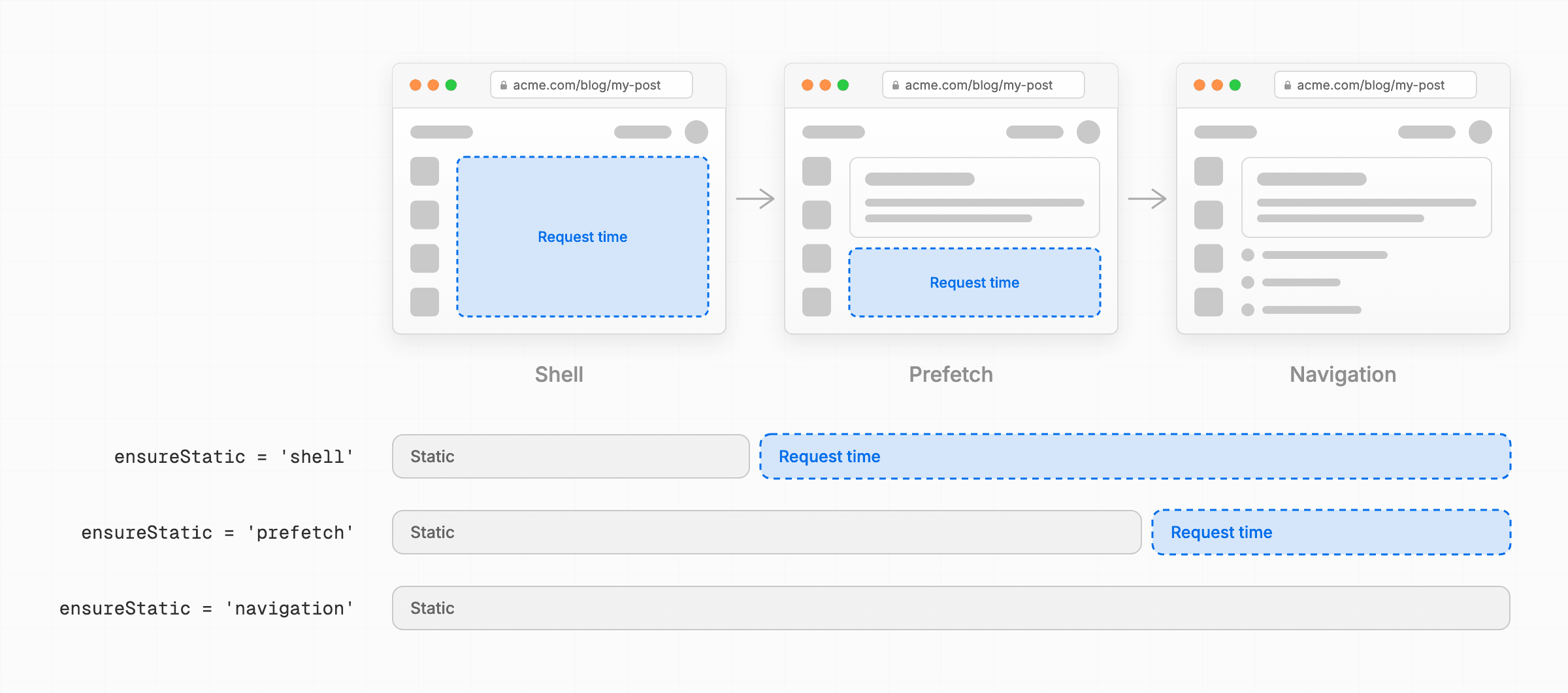
根据哪个请求必须只使用静态输出来选择级别:
'shell':由默认<Link>加载的 App Shell。'prefetch':App Shell 以及来自<Link prefetch={true}>的逐链接预取,其中可以包含该链接的 URL 数据,例如params。'navigation':完整的路由,包括用户导航后返回的响应。
示例#
以下示例为一家在线商店的三个部分添加静态要求:共享购物车、商品页面和公开购买指南。
app/
├── store/
│   ├── layout.tsx         # 包含购物车的共享布局
│   ├── page.tsx           # 商品目录
│   └── products/
│       └── [slug]/
│           └── page.tsx   # 商品详情和购物车状态
├── guides/
│   └── [id]/
│       └── page.tsx       # 编辑撰写的购买指南
└── ui/
    ├── cart.tsx
    └── product.tsx
lib/
└── guides.ts
启用 Cache Components 和 Partial Prefetching:
import type { NextConfig } from 'next'

const nextConfig: NextConfig = {
  cacheComponents: true,
  partialPrefetching: true,
}

export default nextConfig
第 1 步:加载静态 App Shell#
共享的商店布局会显示访客的购物车数量。CartButton 在服务器上从 cookie 读取该数量:
import { cookies } from 'next/headers'

export async function CartButton() {
  const value = Number((await cookies()).get('cart-count')?.value ?? 0)
  return <button>Cart ({value})</button>
}
布局将 CartButton 放在 <Suspense> 中,在当前数量渲染期间提供静态回退内容:
import Link from 'next/link'
import { Suspense } from 'react'
import { CartButton } from '@/app/ui/cart'

export default function StoreLayout({ children }: LayoutProps<'/store'>) {
  return (
    <>
      <nav>
        <Link href="/store">Products</Link>
        <Link href="/guides">Buying guides</Link>
        <Suspense fallback={<button>Cart (0)</button>}>
          <CartButton />
        </Suspense>
      </nav>
      <main>{children}</main>
    </>
  )
}
导航和购物车回退内容在所有访客之间共享。加载指向商店的链接时,不应在用户点击之前就在服务器上渲染个性化的购物车数量。添加 ensureStatic = 'shell',使默认的 <Link> 只请求静态 App Shell:
import Link from 'next/link'
import { Suspense } from 'react'
import { CartButton } from '@/app/ui/cart'

export const ensureStatic = 'shell'

export default function StoreLayout({ children }: LayoutProps<'/store'>) {
  // ...
}
现在,指向商店的默认 <Link> 会从静态输出加载导航和 Cart (0) 回退内容。直到后续的逐链接预取或导航请求时,服务器才会渲染当前的购物车数量。这避免了为用户可能永远不会点击的链接执行请求时服务端工作。
小知识:如果只需要将
CartButton从 App Shell 中推迟,你可以在该子树内调用await prefetch()。这里,要求适用于整个商店外壳(包括未来的更改),因此布局使用ensureStatic = 'shell'。
第 2 步:预取静态商品详情#
每个商品页面都结合了可在访客之间复用的详情和取决于当前访客的购物车操作。ProductDetails 使用 use cache 缓存其查询,而 ProductCartStatus 读取 cookie 来检查商品是否已在购物车中:
import { cookies } from 'next/headers'
import { db } from '@/lib/db'

type Params = Promise<{ slug: string }>

export async function ProductDetails({ params }: { params: Params }) {
  const { slug } = await params
  const product = await getProduct(slug)
  return <h1>{product.name}</h1>
}

export async function ProductCartStatus({ params }: { params: Params }) {
  const { slug } = await params
  const cart = (await cookies()).get('cart')?.value?.split(',') ?? []
  return (
    <button>{cart.includes(slug) ? 'Remove from cart' : 'Add to cart'}</button>
  )
}

async function getProduct(slug: string) {
  'use cache'
  return db.product.findUniqueOrThrow({ where: { slug } })
}
商品路由使用 generateStaticParams() 预渲染目录中的商品 URL。独立的 <Suspense> 边界让商品详情可以以静态购物车回退内容渲染:
import { Suspense } from 'react'
import { ProductCartStatus, ProductDetails } from '@/app/ui/product'

export function generateStaticParams() {
  return [{ slug: 'coffee-grinder' }]
}

export default function ProductPage({
  params,
}: PageProps<'/store/products/[slug]'>) {
  return (
    <>
      <Suspense fallback={<p>Loading product...</p>}>
        <ProductDetails params={params} />
      </Suspense>
      <Suspense fallback={<button>Add to cart</button>}>
        <ProductCartStatus params={params} />
      </Suspense>
    </>
  )
}
指向商品的默认链接会加载 App Shell,其中包含商品回退内容。由于商品详情已经预渲染,目录可以通过设置 prefetch={true} 在点击之前包含它们:
<Link href="/store/products/coffee-grinder" prefetch={true}>
  Coffee grinder
</Link>
每个可见的 prefetch={true} 链接都可以渲染 ProductCartStatus,为该商品个性化购物车操作。因此,一个包含 20 个可见商品的网格,可能会在用户点击商品之前触发 20 次请求时服务端渲染。
添加 ensureStatic = 'prefetch',使每次商品预取只使用静态输出:
import { Suspense } from 'react'
import { ProductCartStatus, ProductDetails } from '@/app/ui/product'

export const ensureStatic = 'prefetch'

export default function ProductPage({
  params,
}: PageProps<'/store/products/[slug]'>) {
  // ...
}
现在,每次商品预取都包含缓存的商品详情和静态的 Add to cart 回退内容,而不会调用请求时服务端渲染。当前购物车状态会在用户点击链接后渲染。
ensureStatic 值覆盖整个路由,包括导出它的段之上的布局。在商品路由上,'prefetch' 还通过逐链接预取保持商店布局为静态。
小知识:如果只需要将
ProductCartStatus从逐链接预取中推迟,你可以在读取 cookie 之前调用await navigation()。这里,每次商品预取都必须避免请求时服务端渲染,因此页面使用ensureStatic = 'prefetch'。
第 3 步:预渲染购买指南#
商店还有公开的购买指南。每篇指南从数据库读取内容,并应用来自 cookie 的主题:
import { Suspense } from 'react'
import { cookies } from 'next/headers'
import { getGuide } from '@/lib/guides'

export default function GuidePage({ params }: PageProps<'/guides/[id]'>) {
  return (
    <Suspense fallback={<p>Loading guide...</p>}>
      <Guide params={params} />
    </Suspense>
  )
}

async function Guide({ params }: { params: Promise<{ id: string }> }) {
  const { id } = await params
  const guide = await getGuide(id)
  const theme = (await cookies()).get('theme')?.value
  return <article data-theme={theme}>{guide.content}</article>
}
现有的 getGuide() 辅助函数执行数据库查询:
import { db } from '@/lib/db'

export async function getGuide(id: string) {
  return db.guide.findUniqueOrThrow({ where: { id } })
}
next build 目前会为商店路由和购买指南生成部分预渲染:
Route (app)
├   /guides/[id]
│ └ ◐ /guides/[id]
├ ◐ /store
└   /store/products/[slug]
  ├ ◐ /store/products/[slug]
  └ ◐ /store/products/coffee-grinder

◐  (Partial Prerender)  预渲染为静态 HTML,并包含服务端流式传输的动态内容
商店和商品路由出现部分输出是意料之中的,因为它们特定于请求的购物车 UI 会在稍后渲染。购买指南是公开的编辑页面,因此它们应返回完整的静态输出,而不进行请求时服务端渲染。添加 ensureStatic = 'navigation':
  import { Suspense } from 'react'
  import { cookies } from 'next/headers'

+ export const ensureStatic = 'navigation'

  export default function GuidePage({ params }) {
    // ...
  }
再次运行 next build 时,Next.js 首先报告该动态路由没有提供任何要预渲染的参数值:
错误:页面 "/guides/[id]":`ensureStatic = "navigation"` 需要一个导出的 `generateStaticParams()` 函数。
了解更多:https://nextjs.org/docs/messages/generate-static-params#with-ensurestatic
    位于已忽略的调用帧中
> 构建时发生错误
错误:无法收集 /guides/[id] 的页面数据
导出 generateStaticParams() 并至少返回一个购买指南 ID。Next.js 会在构建期间预渲染返回的 ID。它可以生成其他允许的 ID,并在首次请求时存储结果供后续请求使用。使用 'navigation' 时,该首次请求会等待完整的静态页面,而不是流式传输回退内容。请参阅 Cache Components 中的 ISR。
添加一个返回要预渲染的指南 ID 的辅助函数:
export async function getGuideIds() {
  const guides = await db.guide.findMany({ select: { id: true } })
  return guides.map(({ id }) => id)
}import { Suspense } from 'react'
import { cookies } from 'next/headers'
import { getGuide, getGuideIds } from '@/lib/guides'
export const ensureStatic = 'navigation'
export async function generateStaticParams() {
const ids = await getGuideIds()
return ids.map((id) => ({ id }))
}
export default function GuidePage({ params }: PageProps<'/guides/[id]'>) {
return (
<Suspense fallback={<p>Loading guide...</p>}>
<Guide params={params} />
</Suspense>
)
}
async function Guide({ params }: { params: Promise<{ id: string }> }) {
const { id } = await params
const guide = await getGuide(id)
const theme = (await cookies()).get('theme')?.value
return <article data-theme={theme}>{guide.content}</article>
}generateStaticParams() 提供了参数值,但指南仍然包含未缓存的和特定于请求的工作。下一次构建会报告该路由无法完全静态:
错误:路由 "/guides/[id]":Next.js 在必须完全静态的路由上遇到了未缓存数据或运行时数据。

该路由被配置为完全静态,但未缓存数据或运行时数据阻止其完全预渲染。

修复方法:
  - [cache] 对于未缓存的数据(`fetch`、数据库调用):使用 `"use cache"` 缓存访问(不适用于 `connection()`)
  - [remove] 移除该数据访问
  - [client] 在客户端读取该数据

了解更多:https://nextjs.org/docs/messages/static-route-dynamic
    at Suspense (<anonymous>)
    at body (<anonymous>)
    at html (<anonymous>)
构建会识别出受影响的路由,但其堆栈帧不包含数据访问的源代码位置。要在修复时获取带 source map 的代码帧,请启动 next dev 并打开 /guides/coffee。如果你只能运行构建,请使用 next build --debug-prerender。
开发遮罩层首先指向未缓存的数据库查询:
return db.guide.findUniqueOrThrow({ where: { id } })它提供了三种处理未缓存数据的方法:
购买指南内容可以在访客之间共享,因此 Cache 修复方式保留了页面的静态要求。为 getGuide() 添加 'use cache' 指令,以便 Next.js 复用查询结果:
import { db } from '@/lib/db'

export async function getGuideIds() {
  const guides = await db.guide.findMany({ select: { id: true } })
  return guides.map(({ id }) => id)
}

export async function getGuide(id: string) {
  'use cache'
  return db.guide.findUniqueOrThrow({ where: { id } })
}
查询被缓存后,遮罩层指向剩余的特定于请求的值:
const theme = (await cookies()).get('theme')?.value遮罩层现在提供了针对运行时数据的修复方法:
购买指南不需要针对访客的主题,因此移除 cookie 访问:
  import { Suspense } from 'react'
- import { cookies } from 'next/headers'
  import { getGuide, getGuideIds } from '@/lib/guides'

  // ...

  async function Guide({ params }) {
    const { id } = await params
    const guide = await getGuide(id)
-   const theme = (await cookies()).get('theme')?.value
-   return <article data-theme={theme}>{guide.content}</article>
+   return <article>{guide.content}</article>
}数据库查询被缓存且特定于请求的主题被移除后,next build 会为列出的指南生成完整的静态页面:
Route (app)
├   /guides/[id]
│ ├ ◐ /guides/[id]
│ └ ○ /guides/coffee
├ ◐ /store
└   /store/products/[slug]
  ├ ◐ /store/products/[slug]
  └ ◐ /store/products/coffee-grinder

○  (Static)             预渲染为静态内容
◐  (Partial Prerender)  预渲染为静态 HTML,并包含服务端流式传输的动态内容
列出的指南现在已完全预渲染。对于未列出的指南 ID,当 Next.js 生成并存储完整静态页面时,首次请求会等待。购买指南不再执行请求时服务端渲染,并且 ensureStatic 会报告未来任何破坏该要求的更改。
现在,商店从静态 App Shell 加载共享导航,在逐链接预取中包含缓存的商品详情而不调用服务器,并为购买指南返回完整的静态输出。个性化的购物车数据仍会在需要时渲染。
后续步骤#
- 优化预取以控制各个子树何时渲染。
- 确保即时导航以验证进入商店的客户端导航会立即显示 UI。
- 迁移到 Cache Components以替换现有应用中诸如
dynamic = 'force-static'之类的路由级配置。