
主题
缓存组件
¥Cache Components
需要了解:Cache Components 是一个可选功能。在 Next.js 配置文件中将
cacheComponents标志设置为true即可启用。详细信息请参见 启用缓存组件。¥Good to know: Cache Components is an opt-in feature. Enable it by setting the
cacheComponentsflag totruein your Next config file. See Enabling Cache Components for more details.
Cache Components 允许你在单个路由中混合静态、缓存和动态内容,从而兼具静态网站的速度和动态渲染的灵活性。
¥Cache Components lets you mix static, cached, and dynamic content in a single route, giving you the speed of static sites with the flexibility of dynamic rendering.
服务器端渲染的应用通常会强制用户在静态页面(速度快但数据过时)和动态页面(数据新鲜但速度慢)之间做出选择。将这项工作移至客户端会增加服务器负载,但代价是更大的包和更慢的初始渲染速度。
¥Server-rendered applications typically force a choice between static pages (fast but stale) and dynamic pages (fresh but slow). Moving this work to the client trades server load for larger bundles and slower initial rendering.
Cache Components 通过将路由预渲染成静态 HTML 外壳并立即发送到浏览器来消除这些权衡,动态内容会在准备就绪后更新 UI。
¥Cache Components eliminates these tradeoffs by prerendering routes into a static HTML shell that's immediately sent to the browser, with dynamic content updating the UI as it becomes ready.
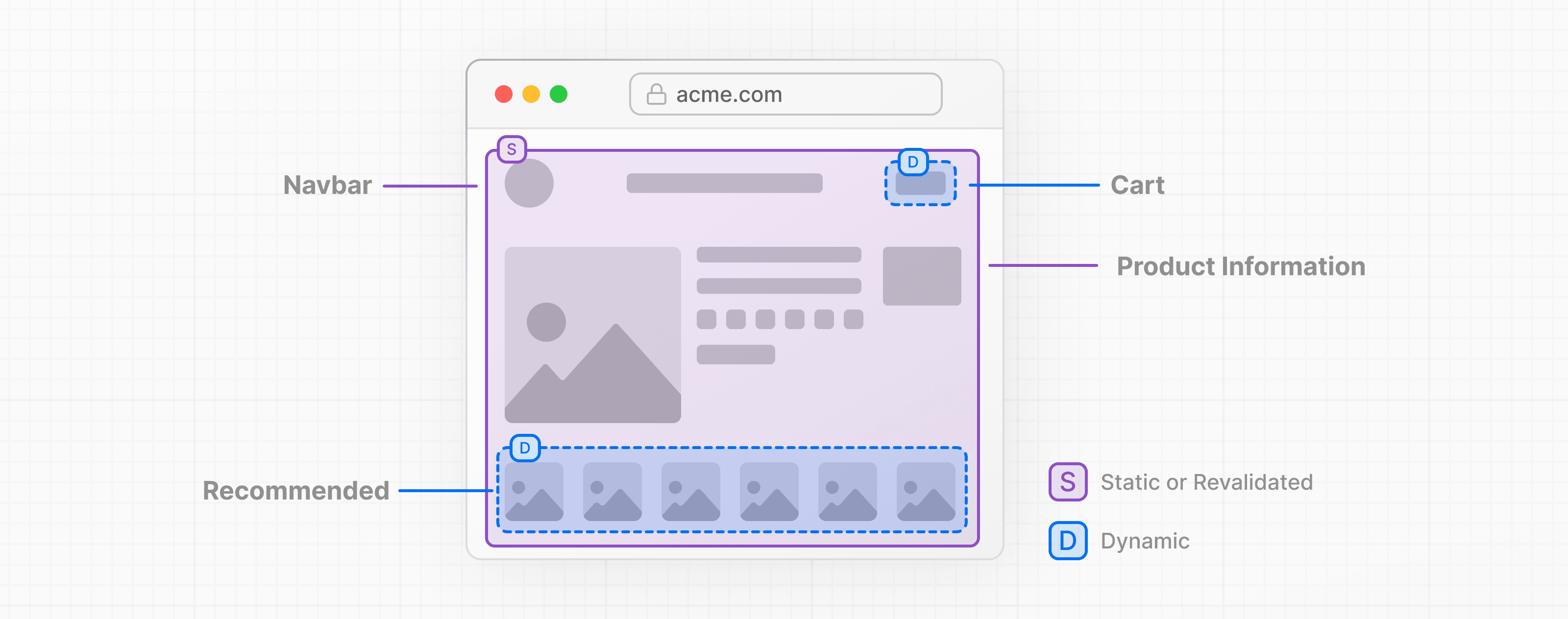
缓存组件的渲染方式
¥How rendering works with Cache Components
在构建时,Next.js 会渲染路由的组件树。只要组件不访问网络资源、某些系统 API 或不需要传入请求即可渲染,其输出就会自动添加到静态 shell 中。否则,你必须选择如何处理它们:
¥At build time, Next.js renders your route's component tree. As long as components don't access network resources, certain system APIs, or require an incoming request to render, their output is automatically added to the static shell. Otherwise, you must choose how to handle them:
通过将组件封装在 React 的
<Suspense>或 显示备用 UI 中,延迟渲染到请求时间,直到内容准备就绪。¥Defer rendering to request time by wrapping components in React's
<Suspense>, showing fallback UI until the content is ready, or使用
use cache指令缓存结果到 将其包含在静态 shell 中(如果不需要请求数据)。¥Cache the result using the
use cachedirective to include it in the static shell (if no request data is needed)
由于此操作在请求到达之前发生,因此我们称之为预渲染。此功能会生成一个静态框架,其中包含用于初始页面加载的 HTML 和用于客户端导航的序列化 RSC 有效负载,确保无论用户是直接访问 URL 还是从其他页面跳转而来,浏览器都能立即接收到完全渲染的内容。
¥Because this happens ahead of time, before a request arrives, we refer to it as prerendering. This generates a static shell consisting of HTML for initial page loads and a serialized RSC Payload for client-side navigation, ensuring the browser receives fully rendered content instantly whether users navigate directly to the URL or transition from another page.
Next.js 要求你显式处理在预渲染期间无法完成的组件。如果数据没有被 <Suspense> 封装或标记为 use cache,你将在开发和构建期间看到 Uncached data was accessed outside of <Suspense> 错误。
¥Next.js requires you to explicitly handle components that can't complete during prerendering. If they aren't wrapped in <Suspense> or marked with use cache, you'll see an Uncached data was accessed outside of <Suspense> error during development and build time.
需要了解:缓存可以应用于组件或函数级别,而回退 UI 可以围绕任何子树定义,这意味着你可以在单个路由中组合静态、缓存和动态内容。
¥Good to know: Caching can be applied at the component or function level, while fallback UI can be defined around any subtree, which means you can compose static, cached, and dynamic content within a single route.
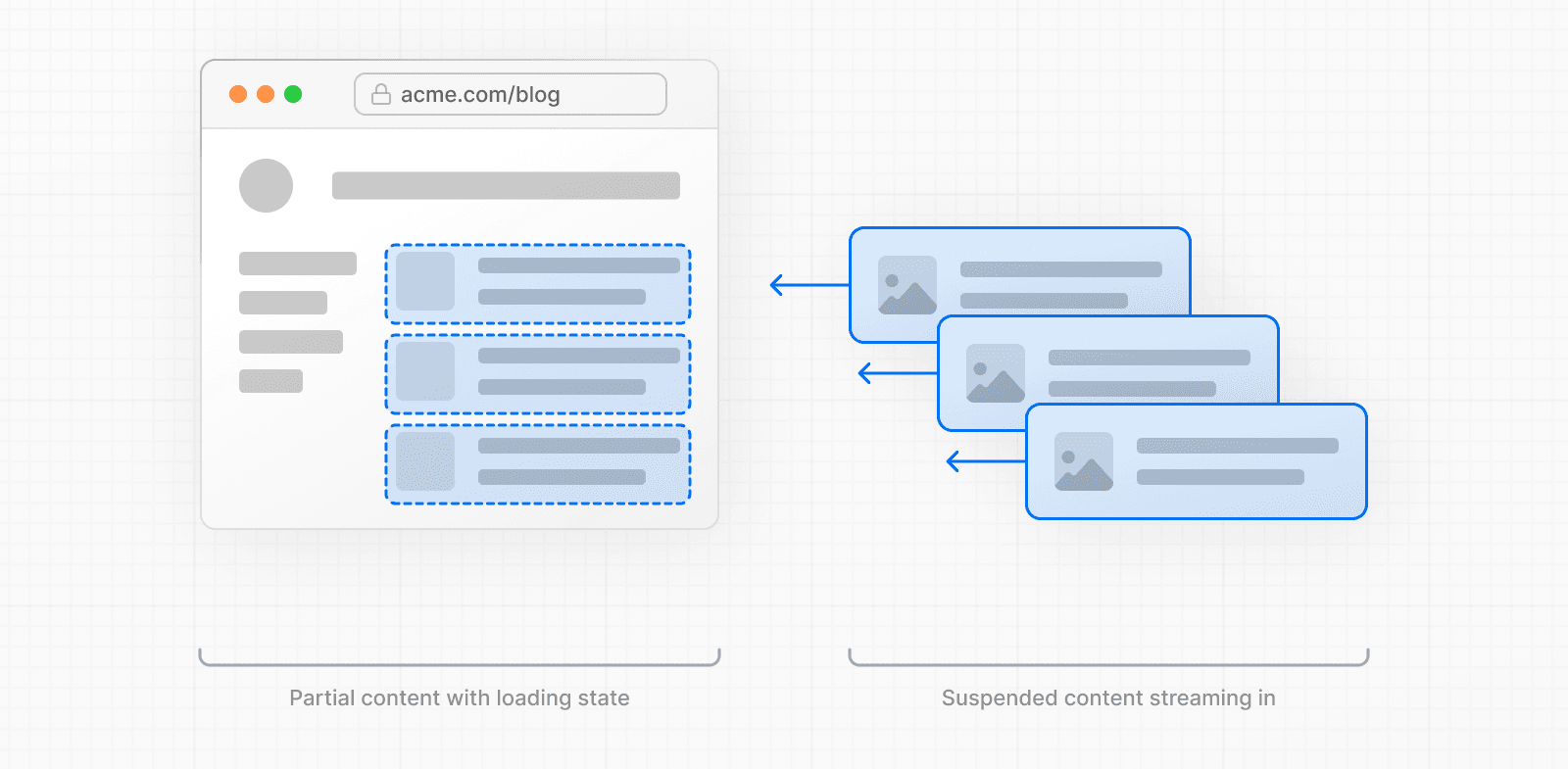
这种渲染方法称为部分预渲染,它是缓存组件的默认行为。在本文档的其余部分,我们将简称其为 "prerendering",它可以生成部分或完整的输出。
¥This rendering approach is called Partial Prerendering, and it's the default behavior with Cache Components. For the rest of this document, we simply refer to it as "prerendering" which can produce a partial or complete output.
🎥 观看:部分预渲染的原理及工作方式 → YouTube(10 分钟)。
¥🎥 Watch: Why Partial Prerendering and how it works → YouTube (10 minutes).
自动预渲染内容
¥Automatically prerendered content
诸如同步 I/O、模块导入和纯计算之类的操作可以在预渲染期间完成。仅使用这些操作的组件,其渲染输出将包含在静态 HTML shell 中。
¥Operations like synchronous I/O, module imports, and pure computations can complete during prerendering. Components using only these operations have their rendered output included in the static HTML shell.
由于 Page 组件中的所有操作都在渲染期间完成,因此其渲染输出会自动包含在静态 shell 中。当布局和页面预渲染都成功时,整个路由将渲染静态页面。
¥Because all operations in the Page component below complete during rendering, its rendered output is automatically included in the static shell. When both the layout and page prerender successfully, the entire route is the static shell.
tsx
import fs from 'node:fs'

export default async function Page() {
  // Synchronous file system read
  const content = fs.readFileSync('./config.json', 'utf-8')

  // Module imports
  const constants = await import('./constants.json')

  // Pure computations
  const processed = JSON.parse(content).items.map((item) => item.value * 2)

  return (
    <div>
      <h1>{constants.appName}</h1>
      <ul>
        {processed.map((value, i) => (
          <li key={i}>{value}</li>
        ))}
      </ul>
    </div>
  )
}
需要了解:你可以通过检查构建输出摘要来验证路由是否已完全预渲染。或者,你可以通过在浏览器中查看页面源代码,了解添加到任何页面静态框架中的内容。
¥Good to know: You can verify that a route was fully prerendered by checking the build output summary. Alternatively, see what content was added to the static shell of any page by viewing the page source in your browser.
延迟渲染至请求时间
¥Defer rendering to request time
在预渲染期间,当 Next.js 遇到无法完成的工作(例如网络请求、访问请求数据或异步操作)时,需要你显式处理。要将渲染延迟到请求时,父组件必须使用 Suspense 边界提供备用 UI。备用缓存成为静态 shell 的一部分,而实际内容在请求时解析。
¥During prerendering, when Next.js encounters work it can't complete (like network requests, accessing request data, or async operations), it requires you to explicitly handle it. To defer rendering to request time, a parent component must provide fallback UI using a Suspense boundary. The fallback becomes part of the static shell while the actual content resolves at request time.
将 Suspense 边界尽可能靠近需要它们的组件。此功能最大限度地增加了静态 shell 中的内容量,因为边界之外的所有内容仍然可以正常预渲染。
¥Place Suspense boundaries as close as possible to the components that need them. This maximizes the amount of content in the static shell, since everything outside the boundary can still prerender normally.
需要了解:使用 Suspense 边界,多个动态部分可以并行渲染,而不是相互阻塞,从而缩短总加载时间。
¥Good to know: With Suspense boundaries, multiple dynamic sections can render in parallel rather than blocking each other, reducing total load time.
动态内容
¥Dynamic content
外部系统异步提供内容,这通常需要不可预测的时间才能解析,甚至可能失败。因此,预渲染不会自动执行这些操作。
¥External systems provide content asynchronously, which often takes an unpredictable time to resolve and may even fail. This is why prerendering doesn't execute them automatically.
通常,当每次请求都需要从源获取最新数据时(例如实时信息流或个性化内容),可以通过提供带有 Suspense 边界的备用 UI 来延迟渲染。
¥In general, when you need the latest data from the source on each request (like real-time feeds or personalized content), defer rendering by providing fallback UI with a Suspense boundary.
例如,下面的 DynamicContent 组件使用了多个不会自动预渲染的操作。
¥For example, the DynamicContent component below uses multiple operations that are not automatically prerendered.
tsx
import { Suspense } from 'react'
import fs from 'node:fs/promises'

async function DynamicContent() {
  // Network request
  const data = await fetch('https://api.example.com/data')

  // Database query
  const users = await db.query('SELECT * FROM users')

  // Async file system operation
  const file = await fs.readFile('..', 'utf-8')

  // Simulating external system delay
  await new Promise((resolve) => setTimeout(resolve, 100))

  return <div>Not in the static shell</div>
}
要在页面中使用 DynamicContent,请将其封装在 <Suspense> 中以定义备用 UI:
¥To use DynamicContent within a page, wrap it in <Suspense> to define fallback UI:
tsx
export default async function Page(props) {
  return (
    <>
      <h1>Part of the static shell</h1>
      {/* <p>Loading..</p> is part of the static shell */}
      <Suspense fallback={<p>Loading..</p>}>
        <DynamicContent />
        <div>Sibling excluded from static shell</div>
      </Suspense>
    </>
  )
}
预渲染会在 fetch 请求处停止。请求本身不会启动,其后的任何代码也不会执行。
¥Prerendering stops at the fetch request. The request itself is not started, and any code after it is not executed.
备用缓存 (<p>Loading...</p>) 包含在静态 shell 中,而组件的内容在请求时流式传输。
¥The fallback (<p>Loading...</p>) is included in the static shell, while the component's content streams at request time.
在本例中,由于所有操作(网络请求、数据库查询、文件读取和超时)都在同一组件内按顺序执行,因此内容只有在所有操作完成后才会显示。
¥In this example, since all operations (network request, database query, file read, and timeout) run sequentially within the same component, the content won't appear until they all complete.
需要了解:对于不经常更改的动态内容,你可以使用
use cache将动态数据包含在静态 shell 中,而不是以流式传输的方式传输。请参阅 预渲染期间 部分获取示例。¥Good to know: For dynamic content that doesn't change frequently, you can use
use cacheto include the dynamic data in the static shell instead of streaming it. See the during prerendering section for an example.
运行时数据
¥Runtime data
一种需要请求上下文的特定类型的动态数据,仅在用户发出请求时可用。
¥A specific type of dynamic data that requires request context, only available when a user makes a request.
cookies()- 用户 Cookie 数据¥
cookies()- User's cookie dataheaders()- 请求头¥
headers()- Request headerssearchParams- URL 查询参数¥
searchParams- URL query parametersparams- 动态路由参数(除非通过generateStaticParams提供了至少一个示例)。请参阅 使用缓存组件的动态路由 以了解详细模式。¥
params- Dynamic route parameters (unless at least one sample is provided viagenerateStaticParams). See Dynamic Routes with Cache Components for detailed patterns.
tsx
import { cookies, headers } from 'next/headers'
import { Suspense } from 'react'

async function RuntimeData({ searchParams }) {
  // Accessing request data
  const cookieStore = await cookies()
  const headerStore = await headers()
  const search = await searchParams

  return <div>Not in the static shell</div>
}
要使用 RuntimeData 组件,请将其封装在 <Suspense> 边界中:
¥To use the RuntimeData component, wrap it in a <Suspense> boundary:
tsx
export default async function Page(props) {
  return (
    <>
      <h1>Part of the static shell</h1>
      {/* <p>Loading..</p> is part of the static shell */}
      <Suspense fallback={<p>Loading..</p>}>
        <RuntimeData searchParams={props.searchParams} />
        <div>Sibling excluded from static shell</div>
      </Suspense>
    </>
  )
}
如果你需要在不访问上述任何运行时 API 的情况下延迟到请求时间,请使用 connection()。
¥Use connection() if you need to defer to request time without accessing any of the runtime APIs above.
需要了解:运行时数据不能与
use cache一起缓存,因为它需要请求上下文。访问运行时 API 的组件必须始终封装在<Suspense>中。但是,你可以从运行时数据中提取值,并将其作为参数传递给缓存函数。请参阅 处理运行时数据 部分获取示例。¥Good to know: Runtime data cannot be cached with
use cachebecause it requires request context. Components that access runtime APIs must always be wrapped in<Suspense>. However, you can extract values from runtime data and pass them as arguments to cached functions. See the with runtime data section for an example.
非确定性操作
¥Non-deterministic operations
诸如 Math.random()、Date.now() 或 crypto.randomUUID() 之类的操作每次执行都会产生不同的值。为确保这些操作在请求时运行(为每个请求生成唯一值),缓存组件要求你在动态或运行时数据访问后显式调用这些操作来表明此意图。
¥Operations like Math.random(), Date.now(), or crypto.randomUUID() produce different values each time they execute. To ensure these run at request time (generating unique values per request), Cache Components requires you to explicitly signal this intent by calling these operations after dynamic or runtime data access.
tsx
import { connection } from 'next/server'
import { Suspense } from 'react'

async function UniqueContent() {
  // Explicitly defer to request time
  await connection()

  // Non-deterministic operations
  const random = Math.random()
  const now = Date.now()
  const date = new Date()
  const uuid = crypto.randomUUID()
  const bytes = crypto.getRandomValues(new Uint8Array(16))

  return (
    <div>
      <p>{random}</p>
      <p>{now}</p>
      <p>{date.getTime()}</p>
      <p>{uuid}</p>
      <p>{bytes}</p>
    </div>
  )
}
由于 UniqueContent 组件会延迟到请求时间执行,因此要在路由中使用它,必须将其封装在 <Suspense> 中:
¥Because the UniqueContent component defers to request time, to use it within a route, it must be wrapped in <Suspense>:
tsx
export default async function Page() {
  return (
    // <p>Loading..</p> is part of the static shell
    <Suspense fallback={<p>Loading..</p>}>
      <UniqueContent />
    </Suspense>
  )
}
每个传入的请求都会看到不同的随机数、日期等。
¥Every incoming request would see different random numbers, date, etc.
需要了解:你可以使用
use cache缓存非确定性操作。请参阅 处理非确定性操作 部分获取示例。¥Good to know: You can cache non-deterministic operations with
use cache. See the with non-deterministic operations section for examples.
使用 use cache
¥Using use cache
use cache 指令缓存异步函数和组件的返回值。你可以在函数、组件或文件级别应用它。
¥The use cache directive caches the return value of async functions and components. You can apply it at the function, component, or file level.
来自父作用域的参数和任何封闭值都会自动成为 缓存键 的一部分,这意味着不同的输入会生成不同的缓存条目。这支持个性化或参数化的缓存内容。
¥Arguments and any closed-over values from parent scopes automatically become part of the cache key, which means different inputs produce separate cache entries. This enables personalized or parameterized cached content.
当 动态内容 不需要在每次请求时都从源头重新获取时,缓存 动态内容 允许你在预渲染期间将内容包含在静态 shell 中,或在运行时跨多个请求重用结果。
¥When dynamic content doesn't need to be fetched fresh from the source on every request, caching it lets you include the content in the static shell during prerendering, or reuse the result at runtime across multiple requests.
缓存的内容可以通过两种方式重新验证:根据缓存生命周期自动添加,或使用带有 revalidateTag 或 updateTag 的标签按需添加。
¥Cached content can be revalidated in two ways: automatically based on the cache lifetime, or on-demand using tags with revalidateTag or updateTag.
需要了解:请参阅 序列化要求和约束 以了解哪些内容可以缓存以及参数的工作原理。
¥Good to know: See serialization requirements and constraints for details on what can be cached and how arguments work.
预渲染期间
¥During prerendering
虽然 动态内容 是从外部源获取的,但它在两次访问之间通常不太可能发生变化。产品目录数据会随库存变化而更新,博客文章内容在发布后很少更改,而过去日期的分析报告保持不变。
¥While dynamic content is fetched from external sources, it's often unlikely to change between accesses. Product catalog data updates with inventory changes, blog post content rarely changes after publishing, and analytics reports for past dates remain static.
如果此数据不依赖于 运行时数据,你可以使用 use cache 指令将其包含在静态 HTML 代码中。使用 cacheLife 定义缓存数据的使用时长。
¥If this data doesn't depend on runtime data, you can use the use cache directive to include it in the static HTML shell. Use cacheLife to define how long to use the cached data.
重新验证时,静态 shell 会更新为新内容。请参阅 标签和重新验证 以了解按需重新验证的详细信息。
¥When revalidation occurs, the static shell is updated with fresh content. See Tagging and revalidating for details on on-demand revalidation.
tsx
import { cacheLife } from 'next/cache'

export default async function Page() {
  'use cache'
  cacheLife('hours')

  const users = await db.query('SELECT * FROM users')

  return (
    <ul>
      {users.map((user) => (
        <li key={user.id}>{user.name}</li>
      ))}
    </ul>
  )
}
cacheLife 函数接受一个缓存配置文件名称(例如 'hours'、'days' 或 'weeks')或一个自定义配置对象来控制缓存行为:
¥The cacheLife function accepts a cache profile name (like 'hours', 'days', or 'weeks') or a custom configuration object to control cache behavior:
tsx
import { cacheLife } from 'next/cache'

export default async function Page() {
  'use cache'
  cacheLife({
    stale: 3600, // 1 hour until considered stale
    revalidate: 7200, // 2 hours until revalidated
    expire: 86400, // 1 day until expired
  })

  const users = await db.query('SELECT * FROM users')

  return (
    <ul>
      {users.map((user) => (
        <li key={user.id}>{user.name}</li>
      ))}
    </ul>
  )
}
请参阅 cacheLife API 参考 获取可用配置文件和自定义配置选项。
¥See the cacheLife API reference for available profiles and custom configuration options.
处理运行时数据
¥With runtime data
运行时数据和 use cache 不能在同一作用域中使用。但是,你可以从运行时 API 中提取值,并将其作为参数传递给缓存函数。
¥Runtime data and use cache cannot be used in the same scope. However, you can extract values from runtime APIs and pass them as arguments to cached functions.
tsx
import { cookies } from 'next/headers'
import { Suspense } from 'react'

export default function Page() {
  // Page itself creates the dynamic boundary
  return (
    <Suspense fallback={<div>Loading...</div>}>
      <ProfileContent />
    </Suspense>
  )
}

// Component (not cached) reads runtime data
async function ProfileContent() {
  const session = (await cookies()).get('session')?.value

  return <CachedContent sessionId={session} />
}

// Cached component/function receives data as props
async function CachedContent({ sessionId }: { sessionId: string }) {
  'use cache'
  // sessionId becomes part of cache key
  const data = await fetchUserData(sessionId)
  return <div>{data}</div>
}
在请求时,如果找不到匹配的缓存条目,则执行 CachedContent,并将结果存储以供后续请求使用。
¥At request time, CachedContent executes if no matching cache entry is found, and stores the result for future requests.
处理非确定性操作
¥With non-deterministic operations
在 use cache 作用域内,非确定性操作在预渲染期间执行。当你希望所有用户都能获得相同的渲染输出时,此功能非常有用:
¥Within a use cache scope, non-deterministic operations execute during prerendering. This is useful when you want the same rendered output served to all users:
tsx
export default async function Page() {
  'use cache'

  // Execute once, then cached for all requests
  const random = Math.random()
  const random2 = Math.random()
  const now = Date.now()
  const date = new Date()
  const uuid = crypto.randomUUID()
  const bytes = crypto.getRandomValues(new Uint8Array(16))

  return (
    <div>
      <p>
        {random} and {random2}
      </p>
      <p>{now}</p>
      <p>{date.getTime()}</p>
      <p>{uuid}</p>
      <p>{bytes}</p>
    </div>
  )
}
在缓存重新验证之前,所有请求都将通过包含相同随机数、时间戳和 UUID 的路由进行处理。
¥All requests will be served a route containing the same random numbers, timestamp, and UUID until the cache is revalidated.
标签和重新验证
¥Tagging and revalidating
使用 cacheTag 标记缓存数据,并在数据变更后使用 updateTag 在服务器操作中重新验证数据以实现即时更新,或在可以接受更新延迟的情况下使用 revalidateTag。
¥Tag cached data with cacheTag and revalidate it after mutations using updateTag in Server Actions for immediate updates, or revalidateTag when delays in updates are acceptable.
使用 updateTag
¥With updateTag
当需要在同一请求中使缓存数据过期并立即刷新时,请使用 updateTag:
¥Use updateTag when you need to expire and immediately refresh cached data within the same request:
tsx
import { cacheTag, updateTag } from 'next/cache'

export async function getCart() {
  'use cache'
  cacheTag('cart')
  // fetch data
}

export async function updateCart(itemId: string) {
  'use server'
  // write data using the itemId
  // update the user cart
  updateTag('cart')
}
使用 revalidateTag
¥With revalidateTag
当只想使已正确标记且具有“过期后重新验证”行为的缓存条目失效时,请使用 revalidateTag。这对于可以容忍最终一致性的静态内容来说是理想的选择。
¥Use revalidateTag when you want to invalidate only properly tagged cached entries with stale-while-revalidate behavior. This is ideal for static content that can tolerate eventual consistency.
tsx
import { cacheTag, revalidateTag } from 'next/cache'

export async function getPosts() {
  'use cache'
  cacheTag('posts')
  // fetch data
}

export async function createPost(post: FormData) {
  'use server'
  // write data using the FormData
  revalidateTag('posts', 'max')
}
更详细的说明和使用示例,请参阅 use cache API 参考。
¥For more detailed explanation and usage examples, see the use cache API reference.
我应该缓存哪些内容?
¥What should I cache?
你缓存的内容应该取决于你希望 UI 加载状态如何。如果数据不依赖于运行时数据,并且你可以接受在一段时间内为多个请求提供缓存值,请使用 use cache 和 cacheLife 来描述这种行为。
¥What you cache should be a function of what you want your UI loading states to be. If data doesn't depend on runtime data and you're okay with a cached value being served for multiple requests over a period of time, use use cache with cacheLife to describe that behavior.
对于具有更新机制的内容管理系统,请考虑使用缓存时间更长的标签,并依赖 revalidateTag 将静态初始 UI 标记为已准备好重新验证。此模式允许你提供快速的缓存响应,同时在内容实际更改时更新内容,而不是提前使缓存过期。
¥For content management systems with update mechanisms, consider using tags with longer cache durations and rely on revalidateTag to mark static initial UI as ready for revalidation. This pattern allows you to serve fast, cached responses while still updating content when it actually changes, rather than expiring the cache preemptively.
整合所有内容
¥Putting it all together
以下是一个完整的示例,展示了静态内容、缓存的动态内容和流式动态内容如何在单个页面上协同工作:
¥Here's a complete example showing static content, cached dynamic content, and streaming dynamic content working together on a single page:
tsx
import { Suspense } from 'react'
import { cookies } from 'next/headers'
import { cacheLife } from 'next/cache'
import Link from 'next/link'

export default function BlogPage() {
  return (
    <>
      {/* Static content - prerendered automatically */}
      <header>
        <h1>Our Blog</h1>
        <nav>
          <Link href="/">Home</Link> | <Link href="/about">About</Link>
        </nav>
      </header>

      {/* Cached dynamic content - included in the static shell */}
      <BlogPosts />

      {/* Runtime dynamic content - streams at request time */}
      <Suspense fallback={<p>Loading your preferences...</p>}>
        <UserPreferences />
      </Suspense>
    </>
  )
}

// Everyone sees the same blog posts (revalidated every hour)
async function BlogPosts() {
  'use cache'
  cacheLife('hours')

  const res = await fetch('https://api.vercel.app/blog')
  const posts = await res.json()

  return (
    <section>
      <h2>Latest Posts</h2>
      <ul>
        {posts.slice(0, 5).map((post: any) => (
          <li key={post.id}>
            <h3>{post.title}</h3>
            <p>
              By {post.author} on {post.date}
            </p>
          </li>
        ))}
      </ul>
    </section>
  )
}

// Personalized per user based on their cookie
async function UserPreferences() {
  const theme = (await cookies()).get('theme')?.value || 'light'
  const favoriteCategory = (await cookies()).get('category')?.value

  return (
    <aside>
      <p>Your theme: {theme}</p>
      {favoriteCategory && <p>Favorite category: {favoriteCategory}</p>}
    </aside>
  )
}
在预渲染期间,静态头部和从 API 获取的博客文章(使用 use cache 缓存)以及用户偏好设置的备用 UI 都会成为静态 shell 的一部分。
¥During prerendering the header (static) and the blog posts fetched from the API (cached with use cache), both become part of the static shell along with the fallback UI for user preferences.
当用户访问页面时,他们会立即看到带有标题和博客文章的预渲染页面。只有个性化偏好设置需要在请求时流式传输,因为它们依赖于用户的 cookie。这确保了页面初始加载速度快,同时还能提供个性化内容。
¥When a user visits the page, they instantly see this prerendered shell with the header and blog posts. Only the personalized preferences need to stream in at request time since they depend on the user's cookies. This ensures fast initial page loads while still providing personalized content.
元数据和视口
¥Metadata and Viewport
generateMetadata 和 generateViewport 是页面或布局渲染的一部分。在预渲染期间,它们对运行时数据或未缓存动态数据的访问与页面的其余部分分开跟踪。
¥generateMetadata and generateViewport are part of rendering your page or layout. During prerendering, their access to runtime data or uncached dynamic data is tracked separately from the rest of the page.
如果页面或布局可预渲染,但只有元数据或视口访问未缓存的动态数据或运行时数据,Next.js 要求显式选择:尽可能缓存数据,或表明延迟渲染是有意为之。请参阅 带有缓存组件的元数据 和 带缓存组件的视口 以了解如何处理此问题。
¥If a page or layout is prerenderable but only metadata or viewport accesses uncached dynamic data or runtime data, Next.js requires an explicit choice: cache the data if possible, or signal that deferred rendering is intentional. See Metadata with Cache Components and Viewport with Cache Components for how to handle this.
启用缓存组件
¥Enabling Cache Components
你可以通过在 Next 配置文件中添加 cacheComponents 选项来启用缓存组件(包括 PPR):
¥You can enable Cache Components (which includes PPR) by adding the cacheComponents option to your Next config file:
ts
import type { NextConfig } from 'next'

const nextConfig: NextConfig = {
  cacheComponents: true,
}

export default nextConfig
需要了解:启用缓存组件后,
GET路由处理程序将遵循与页面相同的预渲染模型。详情请参阅 路由带有缓存组件的处理程序。¥Good to know: When Cache Components is enabled,
GETRoute Handlers follow the same prerendering model as pages. See Route Handlers with Cache Components for details.
导航使用 Activity
¥Navigation uses Activity
启用 cacheComponents 标志后,Next.js 将使用 React 的 <Activity> 组件在客户端导航期间保持组件状态。
¥When the cacheComponents flag is enabled, Next.js uses React's <Activity> component to preserve component state during client-side navigation.
Next.js 不会在页面跳转时卸载之前的路由,而是将 Activity 模式设置为 "hidden"。这意味着:
¥Rather than unmounting the previous route when you navigate away, Next.js sets the Activity mode to "hidden". This means:
在路由之间导航时,组件状态将被保留
¥Component state is preserved when navigating between routes
返回上一路由时,之前的路由会重新出现,并且状态保持不变。
¥When you navigate back, the previous route reappears with its state intact
当路由隐藏时,效果会被清理;当路由再次可见时,效果会被重新创建。
¥Effects are cleaned up when a route is hidden, and recreated when it becomes visible again
这种行为通过在用户来回切换路由时保持 UI 状态(表单输入或展开部分)来改善导航体验。
¥This behavior improves the navigation experience by maintaining UI state (form inputs, or expanded sections) when users navigate back and forth between routes.
需要了解:Next.js 使用启发式方法将最近访问的路由保留为
"hidden",同时从 DOM 中移除较旧的路由,以防止 DOM 过度增长。¥Good to know: Next.js uses heuristics to keep a few recently visited routes
"hidden", while older routes are removed from the DOM to prevent excessive growth.
迁移路由段配置
¥Migrating route segment configs
启用缓存组件后,部分路由段配置选项将不再需要或受支持:
¥When Cache Components is enabled, several route segment config options are no longer needed or supported:
dynamic = "force-dynamic"
不需要。所有页面默认都是动态的。
¥Not needed. All pages are dynamic by default.
tsx
// Before - No longer needed
export const dynamic = 'force-dynamic'

export default function Page() {
  return <div>...</div>
}
tsx
// After - Just remove it
export default function Page() {
  return <div>...</div>
}
dynamic = "force-static"
首先将其移除。在开发和构建期间检测到未处理的动态或运行时数据访问时,Next.js 会抛出错误。否则,prerendering 步骤会自动提取静态 HTML 外壳。
¥Start by removing it. When unhandled dynamic or runtime data access is detected during development and build time, Next.js raises an error. Otherwise, the prerendering step automatically extracts the static HTML shell.
对于动态数据访问,请尽可能将 use cache 添加到数据访问点附近,并使用较长的 cacheLife 值(例如 'max')来保持缓存行为。如有需要,请将其添加到页面或布局的顶部。
¥For dynamic data access, add use cache as close to the data access as possible with a long cacheLife like 'max' to maintain cached behavior. If needed, add it at the top of the page or layout.
对于运行时数据访问(cookies()、headers() 等),错误将引导你访问 使用 Suspense 封装。由于你最初使用的是 force-static,因此必须移除运行时数据访问权限,以避免任何请求时的工作。
¥For runtime data access (cookies(), headers(), etc.), errors will direct you to wrap it with Suspense. Since you started by using force-static, you must remove the runtime data access to prevent any request time work.
tsx
// Before
export const dynamic = 'force-static'

export default async function Page() {
  const data = await fetch('https://api.example.com/data')
  return <div>...</div>
}
tsx
import { cacheLife } from 'next/cache'

// After - Use 'use cache' instead
export default async function Page() {
  'use cache'
  cacheLife('max')
  const data = await fetch('https://api.example.com/data')
  return <div>...</div>
}
revalidate
替换为 cacheLife。使用 cacheLife 函数定义缓存持续时间,而不是路由段配置。
¥Replace with cacheLife. Use the cacheLife function to define cache duration instead of the route segment config.
tsx
// Before
export const revalidate = 3600 // 1 hour

export default async function Page() {
  return <div>...</div>
}
tsx
// After - Use cacheLife
import { cacheLife } from 'next/cache'

export default async function Page() {
  'use cache'
  cacheLife('hours')
  return <div>...</div>
}
fetchCache
不需要。使用 use cache,缓存范围内的所有数据获取都会自动缓存,因此无需使用 fetchCache。
¥Not needed. With use cache, all data fetching within a cached scope is automatically cached, making fetchCache unnecessary.
tsx
// Before
export const fetchCache = 'force-cache'
tsx
// After - Use 'use cache' to control caching behavior
export default async function Page() {
  'use cache'
  // All fetches here are cached
  return <div>...</div>
}
runtime = 'edge'
不支持。Cache Components 需要 Node.js 运行时环境,并且会抛出 Edge 运行时 错误。
¥Not supported. Cache Components requires Node.js runtime and will throw errors with Edge Runtime.